Subscribe For Free Updates!

We'll not spam mate! We promise.

Showing posts with label Windows Phone 7. Show all posts

Aug 9, 2012

Windows Phone 7 App Source Code Tap and Damage

Views:

Tap and DamageToday Will I Give you complete Source Code of My Windows Phone 7 App Tap and Damage  Which has been successively  Published on Market Place.

This an Interesting App and it has had 1500 Download in First  4 Weeks of its publishing .

This Application has not been Coded  in the Processional Way of Programming But it Will Surely Help You Improve Your logic in Programming and Will help You Learn New Interesting Stuff.

Aug 5, 2012

Voice Recognition In Windows Phone 7

Views:

Voice Recognition In Windows Phone 7
Today I will Show you Voice Recognition In Windows Phone 7 (WP7) or Voice to Text In Windows Phone 7 (WP7).
This Is a very Important Topic for Which I searched a but could not get any Success .

We can not add System.Speech.Recognition .dll in Windows Phone 7 if you try to add this dll in Windows Phone 7 Project you will get an Error.


So the question is then how will we recognize the voice in Windows Phone 7 .
there is an architecture to follow this architecture we can easily recognized Voice on Windows Phone.
Voice Recognition In Windows Phone 7


So,
 First We Recode Voice From Windows Phone 7
Then Send This voice to Web Service having Voice Recognition Facility
And We Getting Response from Server .

Now Here First We make a WCF(.SVC) Web service.
in web add a following Method
public string RecognizeSpeech(byte[] speechToParse, int sampleRate)
        {
            SpeechRecognitionEngine sre = new SpeechRecognitionEngine();

          /*  if (_grammar == null)
                InitializeGrammar();
            sre.LoadGrammar(_grammar);*/
          Grammar testGrammar =
            new Grammar(new GrammarBuilder("Ya Allah"));
            testGrammar.Name = "Test Grammar";
            sre.LoadGrammar(testGrammar);
         Grammar testgrammar1 =  new Grammar(new GrammarBuilder("Android"));
            testgrammar1.Name = "Test Grammar";
            sre.LoadGrammar(testgrammar1);
        Grammar testgrammar2 = new Grammar(new GrammarBuilder("Windows Phone"));
           testgrammar2.Name = "Test Grammar";
            sre.LoadGrammar(testgrammar2);
          Grammar testgrammar3 = new Grammar(new GrammarBuilder("Pakistan"));
            testgrammar3.Name = "Test Grammar";
            sre.LoadGrammar(testgrammar3);
        Grammar testgrammar4 = new Grammar(new GrammarBuilder("Sajjad Awan"));
            testgrammar4.Name = "Test Grammar";
            sre.LoadGrammar(testgrammar4);
            //sre.LoadGrammar(new DictationGrammar());

Choices cities = new Choices(new string[] { "Los Angeles", "New York",
"Chicago", "San Francisco", "Miami", "Dallas","landhi" });
           //Choices 
           GrammarBuilder gb = new GrammarBuilder();
           gb.Append("I want to fly from");
           gb.Append(cities);
           gb.Append("to");
           gb.Append(cities);

           // Construct a Grammar object and load it to the recognizer.
           Grammar cityChooser = new Grammar(gb);
           cityChooser.Name = ("City Chooser");
           sre.LoadGrammarAsync(cityChooser);
           MemoryStream ms = new MemoryStream(speechToParse);
 var formatInfo = new SpeechAudioFormatInfo(sampleRate,
AudioBitsPerSample.Sixteen, AudioChannel.Mono);
           sre.SetInputToAudioStream(ms, formatInfo);
        
            
           var result = sre.Recognize();
            ms = null;

            if (result == null )
                return "?";
            else
                return result.Text;
        }

and Also Add In ServiceContract

 [OperationContract]
        string RecognizeSpeech(byte[] speechToParse, int sampleRate);
In Windows Phone

add Foloowing Code in Pageload event
BasicHttpBinding binding = new BasicHttpBinding()
{ MaxReceivedMessageSize = int.MaxValue, MaxBufferSize = int.MaxValue };
EndpointAddress address =
new EndpointAddress(@"http://localhost:40427/SpeechService.svc");
_client = new SpeechServiceClient(binding, address);
/*_client.CreateWavStreamCompleted +=;
new EventHandler(_client_CreateWavStreamCompleted);*/
_client.RecognizeSpeechCompleted +=
new EventHandler(_client_RecognizeSpeechCompleted);
Note In above code you have to generate Event by presings tab Button from key board Two times and not Copy paste
Here the method will Reply to server the following Result
void _client_RecognizeSpeechCompleted(object sender,
RecognizeSpeechCompletedEventArgs e)
        {
txtRecognized.Text = String.Format("Recognized: {0}", e.Result);


}
For Recoding Voice I use Windows Phone 7 sample Sample Code available on MSDN .
1) on Button Press event I start Voice Recording.
2) another Button Press event  I stop Voice Recording.
3)There is a Button Name Recognized press event through which i send Recoded voice to web Service and Result will be show in a textbock.

Note this Service only Recognizes Those words that you Define in Dictionary .

SOURCE CODE DOWNLOAD

Or

SOURCE CODE DOWNLOAD (Recommended)


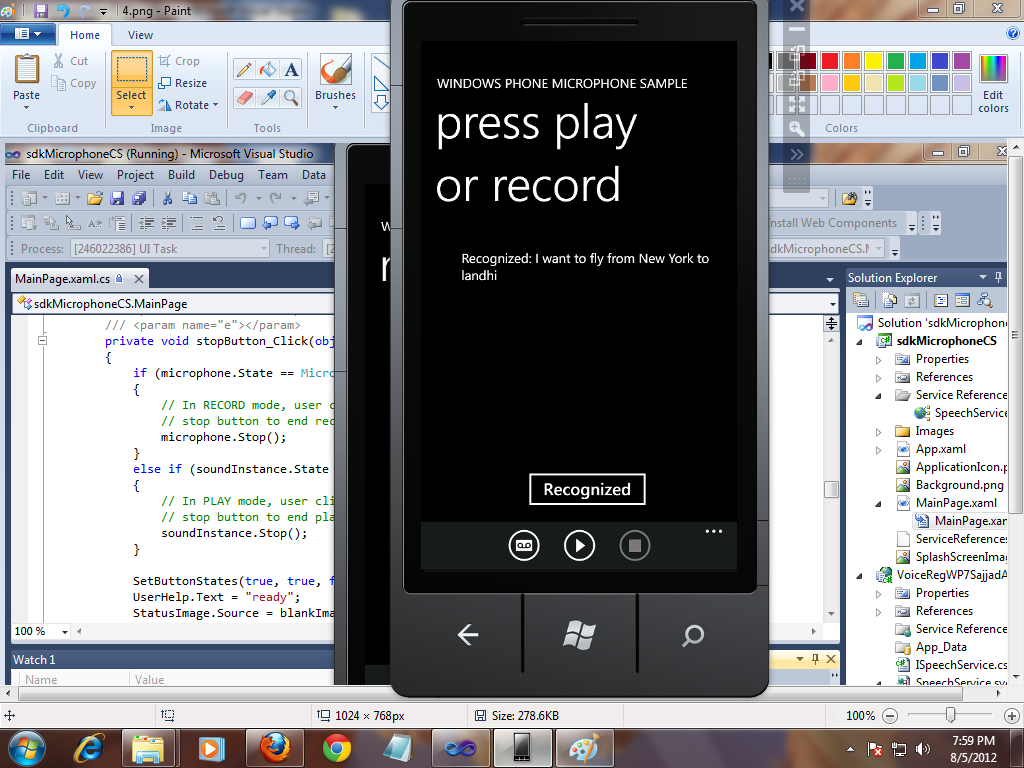
 Some Out put Screen Short


Voice Recognition In Windows Phone 7


Voice Recognition In Windows Phone 7


Voice Recognition In Windows Phone 7


Voice Recognition In Windows Phone 7


Voice Recognition In Windows Phone 7


Jul 31, 2012

Windows Phone 7 App Source Code All Namaz Remainder

Views:


Windows Phone 7 App Source Code All Namaz Remainder

Now Today I share Complete Source code of All Namaz Remainder App Created on Windows Phone 7 Plate Form.


This App Is Successfully Published On Windows Phone 7 Market Place .

This App has 2,000 Downloads in Firsts 3 Week .This Application is Developed by Sajjad Ashraf .


Description Or Features  :-

1) IT Remainder Namaz Timing According to Following   All Major (Fiqa)Firqa.
2) Add ,Remove and Update Remainder Timings
3) Live Qibla Direction.
4) Allow you to Create Personal Remainder with Add, remove Update Facility.

CLICK HERE TO DOWNLOAD SOURCE CODE OF ALL NAMAZ REMAINDER

SOME SCREEN SHOERTS

Windows Phone 7 App Source Code All Namaz Remainder Windows Phone 7 App Source Code All Namaz Remainder


Jul 29, 2012

Access XML File Hosted on Php Server In Windows Phone 7

Views:

Access XML File Hosted on Php Server In Windows Phone 7
To Day I show you how to Access XML File Hosted on Php web Server Server or any other Server  In Windows Phone 7.

As we Know that Use XML Files For Storing data and Retrieving Data Through LINQ (Language Integrated Query  ).

We can Access an XML file From a Local (Isolated Storage  ) and also From a web server Where XML file Is Hosted .


Note In XML File We Can Store XML file on PHP Server or on Free web Hosting Server.
Following Are the Steps Please Follow it.
First We Create an account on  http://www.000webhost.com/  .It Provides Free PHP web Hosting .Note during Signup Choose SUB Domain which is free and (recommended).
Access XML File Hosted on Php Server In Windows Phone 7

Then Confirm Then Confirmation Email.

Now After Confirmation an Window open in which Select Domain Name From Drop Down and Press Go Buttton By this You Move To Control Penal of You Hosting Account.
Access XML File Hosted on Php Server In Windows Phone 7


Now Select File Manager  (Clcik File Manager ) It ask for Password Enter the Password Which you Write in Signup time.
Access XML File Hosted on Php Server In Windows Phone 7

After this you are now in FTP manager Click Public Folder .Now you have to upload an XML file here i don't have any XML you can download Here Which I uploaded on Server .
my XML file Contains Following Data

<?xml version="1.0" ?>
 <People>
  <Person FirstName="Mohammad Sajjad Ashraf" LastName="AWAN" Age="27" />
  <Person FirstName="Mohammad Javed" LastName="Ashraf" Age="27" />
  <Person FirstName="Mohammad Zain Farooq" LastName="Ansari" Age="27" />
  <Person FirstName="Mohammad Irfan" LastName="Khan" Age="26" />
  <Person FirstName="Mohammad Jibran Ahmed" LastName="Khan" Age="28" />
  <Person FirstName="Kate" LastName="Smith" Age="27" />
  <Person FirstName="Tom" LastName="Brown" Age="30" />
  <Person FirstName="Tim" LastName="Stone" Age="36" />
<Person FirstName="Ann" LastName="Peterson" Age="27" /> 
</People>
Now you Xml File is Live and Sucesfully Hosted.
for viewing  URL of hosted XML file Click (Open Link) it open XML file in new Windows with Complete URL Please Save this URL It needs you in further Steps .
Access XML File Hosted on Php Server In Windows Phone 7

So open Visual Studio and Make a Simple  Project on Windows phone 7 on C#.
you Need a list box with A data Template .List box has Following Code .
<ListBox x:Name="listBox2">
     <ListBox.ItemTemplate>
         <DataTemplate>
              <StackPanel Margin="20" >
                       <TextBlock Text="{Binding FirstName}"/>
                       <TextBlock Text="{Binding LastName}"/>
              </StackPanel>
           </DataTemplate>
        </ListBox.ItemTemplate>
 </ListBox>


Now Add a Class in Project Name Person and Write Following Code

public class Person
    {
        string firstname; string lastname;
        int age;
        public string FirstName
        {
            get { return firstname; }
            set { firstname = value; }
        }
        public string LastName
        {
            get { return lastname; }
            set { lastname = value; }
        }
        public int Age
        {
            get
            {
                return age;
            }
            set
            { age = value; }
        }
    }
And Here The Method Which Loads XML Data From PHP server.
public void loadXmlFromPHpServer(string xmlUrl, ListBox listbox)
   {
   try
   {
   WebClient client = new WebClient();
   client.OpenReadCompleted += (sender, e) =>
   {
   if (e.Error != null)
   return;
   Stream str = e.Result;
   XDocument xdoc = XDocument.Load(str);
   var filteredData = from c in xdoc.Descendants("Person")
   where c.Attribute("Age").Value == "27"
   select new Person()
   {
   FirstName = c.Attribute("FirstName").Value,
   LastName = c.Attribute("LastName").Value
   };
   listbox.ItemsSource = filteredData;
   textBlock1.Text = "Total Items are Loaded =" + filteredData.Count<Person>();
   };
   client.OpenReadAsync(new Uri(xmlUrl, UriKind.Absolute));
   }
   catch (Exception)
   {

   }
   }
You can Call This Method By Using Following Code on PageLoadEvent or Clcik event of Button Etc.
 loadXmlFromPHpServer("http://muhammadsajjadashrafawan.comyr.com/MohammadSajjadAshrafAwan.xml", listBox2);
BENEFITS
1) In this  you can Update Data at Any time
2)It Free Data Server just Only For Data Not For Processing and Computation.
3)Data Is update By Admin .
4)We can Update aur Add more Data in XML File After Your Has been Published in Market Place and It Effects deploy  on  all user who Uses Your App.


DOWNLOAD COMPLETE SOURCE CODE

SCREEN SHORTS
Access XML File Hosted on Php Server In Windows Phone 7


May 14, 2012

Virtual Tongue For Mute Published On Market Place Freely Available

Views:

Virtual TongueVirtual Tongue is a Windows Phone 7  Application for Dumb Peoples.Now Freely Available On Market Place .Develop by Team 4PRO.This is an amazing App.Some Interesting feature of this app is as Fellows.

1). This App Provides Virtual  Voice for For Dumb and Mute Peoples through images , Text and Sign Languages.
2). By Using Over Application Dumb peoples can Speak and Understands to other normal person.

3). Virtual Tongue support of 26 different languages to speak.(This feature is not only for dumb or mute a normal Person can be use this For Example Mr.A only Know English or Urdu Or Hindi Or HAZARA But By using over App Mr.A Can Speak  Chines , German,Japaneses etc  ).
4). Virtual Tongue provides templates or sign languages for Uneducated dumb peoples (Who don't know how to write ).
5). Virtual Tongue provide text template ,Vocabulary and Dictionary  for fast writing.
6).  Now dumb peoples only Write or select a template or sign languages and Virtual Tongue (application) produce voice  which is easily under stand by normal peoples.
7). Voice Amplifier Feature is also an interesting feature it has two Purposes.
i) Those Person who's listen loudly Voice Amplifier Feature  of Virtual Tongue  Provides This facility .
ii). By using Virtual Tongue we can recode or Listen some voice of discussion without his Knowledge  just simply place Windows Phone 7 near to this person Hidden.

 This is Virtual Tongue Fist Version and 2nd version is coming soon with more extra features.

4PRO  Team member
 Mohammad Zain Farooq (PROJECT manager and Team Leader)
 Sajjad Ashraf (Logical Programmer  )
Sherish Fahim (Junior Programmer and QA)
Aliya Ahasn(Designer)


SOME SCREEN SHORTS 

FOR DOWNLOAD and MORE INFORMATION.


May 7, 2012

handle currently playing background music in Windows Phone 7

Views:

http://dhananjay25.files.wordpress.com/2011/05/clip_image035.png
In this Post i show you handle background music in windows Phone 7. This is an Important thing if you don't care about it (handle Already Playing music) then you cannot published you apps on Market Place.

Yalla App Publishing Requirement is that when ever an already play music file in Background and your app also have some musics sounds then Yor app should Prompt user to stop already  playing music or not . OR you can Just Prompt like "BACKGROUND SOUND IS STOP".

When the user is already playing music on the phone when the application is launched, the application must not pause, resume, or stop the active music in the phone MediaQueue by calling the Microsoft.Xna.Framework.Media.MediaPlayer class.
The application needs to prompt the user for consent to adjust the volume or stop the music that is currently playing in the Zune queue.

Expected Result by MARKET PLACE

Test Process Required:
1. Play audio and/or music media.
2. Launch the application.
3. The application must not pause, resume, or stop the active music on the device.
4. If the application plays its own background music, the application must prompt for user
consent to stop playing or to adjust the currently playing background music.


Using MediaPlayer.GameHasControl to fix the issue

 This is very simple to address by using MediaPlayer.GamehasControl which is part of Microsoft.Xna.Framework.dll with namespace Microsoft.Xna.Framework.Media. It will return false if there are some background music currently being played and you must prompt the user for the permission to stop the background music and play your own sound.


private void PlaySound(string soundFile)
{
    bool canPlay = false;

    FrameworkDispatcher.Update();
    if (MediaPlayer.GameHasControl)
    {
        canPlay = true;
    }
    else
    {
        if (MessageBox.Show(“Is it ok to stop currently playing
music and play our duck caller sound?”, “Can play duck caller?”,
MessageBoxButton.OKCancel) == MessageBoxResult.OK)
        {
            canPlay = true;
        }
    }

    if (canPlay)
    {
        btnPlay.Visibility = System.Windows.Visibility.Collapsed;
        btnPause.Visibility = System.Windows.Visibility.Visible;

        _updatingMediaTimeline = true;
        mediaDuckSound.Stop();
        mediaDuckSound.Source = new Uri(soundFile, UriKind.Relative);

        mediaDuckSound.Position = System.TimeSpan.FromSeconds(0);
        mediaDuckSound.Volume = 1;
        mediaDuckSound.Play();

        ShowBuyNow();
    }
}


May 6, 2012

VISUAL STUDIO LEARN FEEDS Published On Market Place

Views:

VISUAL STUDIO LEARN FEEDS
This App Is also develop by Me (Sajjad Ashraf). Now Published On Market Place.This is  an Good and Educational Tutorial related  App.Some Interesting feature of this app is as Fellows.
1) It is an RSS App of Visual Studio Learn blog.
 
2)  In This app  You Can Learn Visual studio 2011-2010 
and all version 
C sharp
 Asp.net
 java 
Visual Basic 
Php
 web designing download 
 
3) free Educational Software 
4) free Books  of programming Languages website 
5) software development 
6) Irrlicht 3D XNA GAME coding 
6) Final year Projects 
and ETC..


SOME SCREEN SHORT ARE:

FOR DOWNLOAD AND MORE INFORMATION 


Damage Screen Published On Market Place

Views:

Damage ScreenThis App Is also develop by Me (Sajjad Ashraf). Now Published On Market Place.This is amazing App.Some Interesting feature of this app is as Fellows.
1) This is an Amazing app That Show the experience 
when some one see Your mobile Screen is damage.
 
2) It has 30 amazing Broken Screen Images.
 
3)You Can Select Your Choice and Set to Screen
You can Set damage Screen On the start up of 
Damage Screen


 4) There are two Bottom which are Hidden One is Lower Left Corner of Damage Screen 
and Second is On Lower right corner of damage screen for taking out you from Damage 
Screen.

SOME SCREEN SHORT ARE:

Tap and Damage Published On Market Place

Views:

Tap and DamageThis App Is develop by Me (Sajjad Ashraf). Now Published On Market Place.This is amazing App.Some Interesting feature of this app is as Fellows.
1) Now you can damage your Mobile 
Screen By Simply Tap on it.It 
also Produces screen damaged 
sound.
2) This is an Amazing app That 
Show the experience when some one
see Your mobile Screen is damage.
 
 
3) It has 30 amazing Broken Screen Images
You Can Select Your Choice and Set to Screen
4) You can Set damage Screen On the start up of Damage 
Screen
5) There are two Bottom which are Hidden One is Lower 
Left Corner of Damage Screen and Second is On Lower right corner 
of damage screen for taking out you from Damage Screen.

SOME SCREEN SHORT ARE:


FOR DOWNLOAD AND MORE INFORMATION 

Become a Fan

visual studio learn