Showing posts with label Projects. Show all posts
Aug 31, 2012
Aug 19, 2012
SMS Send and Receive Using AT Commands Complete Source Code
Views:
In Today's article i will demonstrate you How to send and received sms in C# using AT Commands with Complete Source Code.
In This Tutorials I will not use any sms sending and Receiving API , but Learning this Post Completely Care fully INSHA Allah you will be able Develop your Own SMS sending and Receiving API or Classes according to your requirement.
In This tutorials i will use AT commands .AT commands are the Commands which communicates and Controls your Mobile or GSM Modem for Sending and Receiving SmS, you may also Get other Information like Signals Strengths Etc. So it is Recommended for you Before reading this Tutorials to go through AT commands. Following are the links which will help you develop the base :-
In This Tutorials I will not use any sms sending and Receiving API , but Learning this Post Completely Care fully INSHA Allah you will be able Develop your Own SMS sending and Receiving API or Classes according to your requirement.
In This tutorials i will use AT commands .AT commands are the Commands which communicates and Controls your Mobile or GSM Modem for Sending and Receiving SmS, you may also Get other Information like Signals Strengths Etc. So it is Recommended for you Before reading this Tutorials to go through AT commands. Following are the links which will help you develop the base :-
Aug 9, 2012
Windows Phone 7 App Source Code Tap and Damage
Views:
This an Interesting App and it has had 1500 Download in First 4 Weeks of its publishing .
This Application has not been Coded in the Processional Way of Programming But it Will Surely Help You Improve Your logic in Programming and Will help You Learn New Interesting Stuff.
Aug 5, 2012
Voice Recognition In Windows Phone 7
Views:
Today I will Show you Voice Recognition In Windows Phone 7 (WP7) or Voice to Text In Windows Phone 7 (WP7).
This Is a very Important Topic for Which I searched a but could not get any Success .
We can not add System.Speech.Recognition .dll in Windows Phone 7 if you try to add this dll in Windows Phone 7 Project you will get an Error.
This Is a very Important Topic for Which I searched a but could not get any Success .
We can not add System.Speech.Recognition .dll in Windows Phone 7 if you try to add this dll in Windows Phone 7 Project you will get an Error.
So the question is then how will we recognize the voice in Windows Phone 7 .
there is an architecture to follow this architecture we can easily recognized Voice on Windows Phone.
So,
First We Recode Voice From Windows Phone 7
Then Send This voice to Web Service having Voice Recognition Facility
And We Getting Response from Server .
Now Here First We make a WCF(.SVC) Web service.
in web add a following Method
add Foloowing Code in Pageload event
Here the method will Reply to server the following Result
1) on Button Press event I start Voice Recording.
2) another Button Press event I stop Voice Recording.
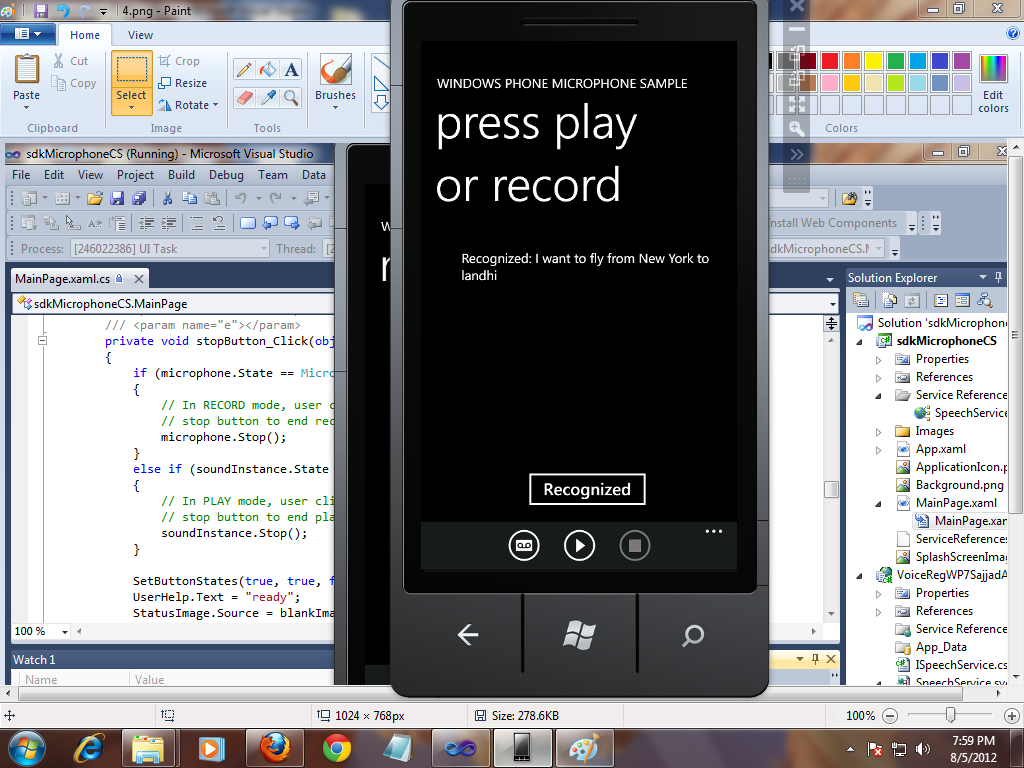
3)There is a Button Name Recognized press event through which i send Recoded voice to web Service and Result will be show in a textbock.
Note this Service only Recognizes Those words that you Define in Dictionary .
SOURCE CODE DOWNLOAD
Or
SOURCE CODE DOWNLOAD (Recommended)
Some Out put Screen Short
there is an architecture to follow this architecture we can easily recognized Voice on Windows Phone.
So,
First We Recode Voice From Windows Phone 7
Then Send This voice to Web Service having Voice Recognition Facility
And We Getting Response from Server .
Now Here First We make a WCF(.SVC) Web service.
in web add a following Method
public string RecognizeSpeech(byte[] speechToParse, int sampleRate)
{
SpeechRecognitionEngine sre = new SpeechRecognitionEngine();
/* if (_grammar == null)
InitializeGrammar();
sre.LoadGrammar(_grammar);*/
Grammar testGrammar =
new Grammar(new GrammarBuilder("Ya Allah"));
testGrammar.Name = "Test Grammar";
sre.LoadGrammar(testGrammar);
Grammar testgrammar1 = new Grammar(new GrammarBuilder("Android"));
testgrammar1.Name = "Test Grammar";
sre.LoadGrammar(testgrammar1);
Grammar testgrammar2 = new Grammar(new GrammarBuilder("Windows Phone"));
testgrammar2.Name = "Test Grammar";
sre.LoadGrammar(testgrammar2);
Grammar testgrammar3 = new Grammar(new GrammarBuilder("Pakistan"));
testgrammar3.Name = "Test Grammar";
sre.LoadGrammar(testgrammar3);
Grammar testgrammar4 = new Grammar(new GrammarBuilder("Sajjad Awan"));
testgrammar4.Name = "Test Grammar";
sre.LoadGrammar(testgrammar4);
//sre.LoadGrammar(new DictationGrammar());
Choices cities = new Choices(new string[] { "Los Angeles", "New York",
"Chicago", "San Francisco", "Miami", "Dallas","landhi" });
//Choices
GrammarBuilder gb = new GrammarBuilder();
gb.Append("I want to fly from");
gb.Append(cities);
gb.Append("to");
gb.Append(cities);
// Construct a Grammar object and load it to the recognizer.
Grammar cityChooser = new Grammar(gb);
cityChooser.Name = ("City Chooser");
sre.LoadGrammarAsync(cityChooser);
MemoryStream ms = new MemoryStream(speechToParse);
var formatInfo = new SpeechAudioFormatInfo(sampleRate,
AudioBitsPerSample.Sixteen, AudioChannel.Mono);
sre.SetInputToAudioStream(ms, formatInfo);
var result = sre.Recognize();
ms = null;
if (result == null )
return "?";
else
return result.Text;
}
and Also Add In ServiceContract
[OperationContract]
string RecognizeSpeech(byte[] speechToParse, int sampleRate);
In Windows Phoneadd Foloowing Code in Pageload event
BasicHttpBinding binding = new BasicHttpBinding()
{ MaxReceivedMessageSize = int.MaxValue, MaxBufferSize = int.MaxValue };
EndpointAddress address =
new EndpointAddress(@"http://localhost:40427/SpeechService.svc");
_client = new SpeechServiceClient(binding, address);
/*_client.CreateWavStreamCompleted +=;
new EventHandler(_client_CreateWavStreamCompleted);*/
_client.RecognizeSpeechCompleted +=
new EventHandler(_client_RecognizeSpeechCompleted);
Note In above code you have to generate Event by presings tab Button from key board Two times and not Copy paste Here the method will Reply to server the following Result
void _client_RecognizeSpeechCompleted(object sender,
RecognizeSpeechCompletedEventArgs e)
{
txtRecognized.Text = String.Format("Recognized: {0}", e.Result);
}
For Recoding Voice I use Windows Phone 7 sample Sample Code available on MSDN .1) on Button Press event I start Voice Recording.
2) another Button Press event I stop Voice Recording.
3)There is a Button Name Recognized press event through which i send Recoded voice to web Service and Result will be show in a textbock.
Note this Service only Recognizes Those words that you Define in Dictionary .
SOURCE CODE DOWNLOAD
Or
SOURCE CODE DOWNLOAD (Recommended)
Some Out put Screen Short
Jul 31, 2012
Windows Phone 7 App Source Code All Namaz Remainder
Views:
Now Today I share Complete Source code of All Namaz Remainder App Created on Windows Phone 7 Plate Form.
This App Is Successfully Published On Windows Phone 7 Market Place .
This App has 2,000 Downloads in Firsts 3 Week .This Application is Developed by Sajjad Ashraf .
Description Or Features :-
1) IT Remainder Namaz Timing According to Following All Major (Fiqa)Firqa.
2) Add ,Remove and Update Remainder Timings
3) Live Qibla Direction.
4) Allow you to Create Personal Remainder with Add, remove Update Facility.
CLICK HERE TO DOWNLOAD SOURCE CODE OF ALL NAMAZ REMAINDER
SOME SCREEN SHOERTS
1) IT Remainder Namaz Timing According to Following All Major (Fiqa)Firqa.
2) Add ,Remove and Update Remainder Timings
3) Live Qibla Direction.
4) Allow you to Create Personal Remainder with Add, remove Update Facility.
CLICK HERE TO DOWNLOAD SOURCE CODE OF ALL NAMAZ REMAINDER
SOME SCREEN SHOERTS
Jun 2, 2011
Send , Receive sms From Pc to mobile Using Mcore .Net sms Library
Views:
Assalam-o-Alikum
To day I am share Mcore .net sms library .This Library is use to Send and Receive sms on Pc .
You need mCoreLib.dll file which Can Be Download here remember it free vision or Demo file .
You need the reference of mCore.lib file to your Program .For this right click on Solution Explorer and select Add reference now go to Browser Tab and add mCore.dll From Your Specified Location .
In this application I create One classes and make method of ,send sms and connect mobile in this class and call these method on the specified Button like For Send sms I call send sms method Behind it .
Now the Class Code is there
To day I am share Mcore .net sms library .This Library is use to Send and Receive sms on Pc .
You need mCoreLib.dll file which Can Be Download here remember it free vision or Demo file .
You need the reference of mCore.lib file to your Program .For this right click on Solution Explorer and select Add reference now go to Browser Tab and add mCore.dll From Your Specified Location .
In this application I create One classes and make method of ,send sms and connect mobile in this class and call these method on the specified Button like For Send sms I call send sms method Behind it .
Now the Class Code is there
using System;
using System.Collections.Generic;
using System.Linq;
using System.Text;
namespace newsmscore
{
class myclass
{
public string output;
public mCore.SMS objSMS = new mCore.SMS();
public void SendMessage(string nos, string msgs)
{
string strMsg = "This is a very long text message and";
strMsg = strMsg + " it has more than one hundred sixty";
strMsg = strMsg + " characters in it. This is to test how";
strMsg = strMsg + " the long message will be sent using";
strMsg = strMsg + " mCore .NET SMS Library.";
try
{
SetCommParameters();
objSMS.Encoding = mCore.Encoding.GSM_Default_7Bit;
objSMS.LongMessage = mCore.LongMessage.Concatenate;
try
{
objSMS.SendSMS(nos,msgs);
output = "Message Sent Sucessfully";
//MessageBox.Show("Message Sent!");
}
catch (mCore.SMSSendException e)
{
// MessageBox.Show("Message Failed!" + "\r\n" + e.ToString());
}
}
catch (mCore.GeneralException e)
{
// MessageBox.Show(e.ToString());
}
catch (Exception e)
{
}
}
public void SetCommParameters()
{
try
{
objSMS.Port = "COM7";// the I/o port throgh which your mobile is connected it may be From Com1-Com20 To cheack it go to device manager and see I/O port
objSMS.BaudRate = mCore.BaudRate.BaudRate_19200;
objSMS.DataBits = mCore.DataBits.Eight;
objSMS.StopBits = mCore.StopBits.One;
objSMS.Parity = mCore.Parity.None;
objSMS.FlowControl = mCore.FlowControl.RTS_CTS;
}
catch (mCore.GeneralException e)
{
// MessageBox.Show(e.ToString());
}
catch (Exception e)
{
}
}
}
}
using System.Collections.Generic;
using System.Linq;
using System.Text;
namespace newsmscore
{
class myclass
{
public string output;
public mCore.SMS objSMS = new mCore.SMS();
public void SendMessage(string nos, string msgs)
{
string strMsg = "This is a very long text message and";
strMsg = strMsg + " it has more than one hundred sixty";
strMsg = strMsg + " characters in it. This is to test how";
strMsg = strMsg + " the long message will be sent using";
strMsg = strMsg + " mCore .NET SMS Library.";
try
{
SetCommParameters();
objSMS.Encoding = mCore.Encoding.GSM_Default_7Bit;
objSMS.LongMessage = mCore.LongMessage.Concatenate;
try
{
objSMS.SendSMS(nos,msgs);
output = "Message Sent Sucessfully";
//MessageBox.Show("Message Sent!");
}
catch (mCore.SMSSendException e)
{
// MessageBox.Show("Message Failed!" + "\r\n" + e.ToString());
}
}
catch (mCore.GeneralException e)
{
// MessageBox.Show(e.ToString());
}
catch (Exception e)
{
}
}
public void SetCommParameters()
{
try
{
objSMS.Port = "COM7";// the I/o port throgh which your mobile is connected it may be From Com1-Com20 To cheack it go to device manager and see I/O port
objSMS.BaudRate = mCore.BaudRate.BaudRate_19200;
objSMS.DataBits = mCore.DataBits.Eight;
objSMS.StopBits = mCore.StopBits.One;
objSMS.Parity = mCore.Parity.None;
objSMS.FlowControl = mCore.FlowControl.RTS_CTS;
}
catch (mCore.GeneralException e)
{
// MessageBox.Show(e.ToString());
}
catch (Exception e)
{
}
}
}
}
and the Out put is Like
To Download Full Project With Code and Exe file Click Here
any Question Or Query please free To ask in comments .
Subscribe to:
Posts (Atom)


+Logo+.png)