Subscribe For Free Updates!

We'll not spam mate! We promise.

Showing posts with label Web service. Show all posts

Jul 13, 2016

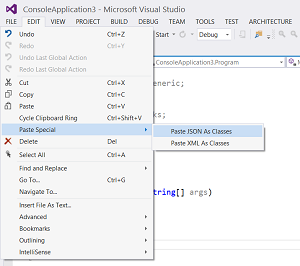
Auto Generate Classes from JSON or XML In Visual studio .Net

Views:

It is very hard to convert the JSON or XML output of Web service or Web API to Model or Object Classes manually.

The best way to handle service response data is, to Deserialize the JSON or XML response into class Object.

For this, you need to create mapping classes for that JSON response. Today I will show you how you can easily and quickly created these classes which are auto-generated by a Visual studio.


Sep 5, 2012

Return JSON Data From Asp.net Web Service

Views:

Return JSON Data From Asp.net Web Service
To Day i will share with you How to  Return JSON Data format From Asp.net Web Service. This is a very important tutorial that is extensively used in may software houses all over the world. This Technique is used for making mobile applications much fast, simpler and Cross plat-form supportive.
I already shared Features and qualities of JSON in my Article WHAT IS JSON .If you Don't know about JSON Please Read it first.

As we know that JSON (JavaScript Object Notation) is a lightweight , text-based open standard  format for exchanging objects .

Sep 2, 2012

What is Json: Access JSON using Java Script

Views:

What is Json , Access JSON using Java Script
To day I will Explain What is Json, Basic  Introduction of JSON  and  Accessing JSON using Java Script.
JSON is very Important for smart phone Online Application Development .
So Before Developing any Smart phone Application we Utilize or before using Any Web service we must have an idea about Json.

So Lets Start with Json Abbreviation.
JSON (JavaScript Object Notation) is a lightweight , text-based open standard
 format for exchanging objects ,
designed for human-readable data interchange. It is derived from the JavaScript programming language for representing simple data structures and associative arrays, called objects. 

Aug 25, 2012

Configure IIS Server and Deploy Asp.net Web Service Locally

Views:

Configure IIS Server and Deploy Asp.net Web Service Locally
To day i will Describe to you how to Configure an IIS Server on Windows XP and Windows 7 and also will be explaining  How to Deploy , Publish and Host Asp.net Web service and Web site on IIS Server Locally.

By Deploying or Hosting Asp.net Website or web service Locally Any One Can Access your Web site or web service through Local , LAN (Local Area Network )  and Through WiFi .


Aug 20, 2012

Show Images Remotely Or from URL in android

Views:

Show Images Remotely Or from URL in android
Today I will show you how to Show Images Remotely (Hosted on a web server or Website) Or from URL in android.

It is very Difficult to Load Images From Remote Server Because there is No Such built-in support in IMAGE VIEW Control of android .

But now  you  Can Easily Access Images Remortely  in android .

I researched A lot and Finally got a Suitable Coding technique for Accessing Images from Website(Remotely)  in Image View android.

One Major Advantage with my code is that allows you to access any image format e.g  .png ,   .jpg  ,  .bmp   or  .gif.


Aug 9, 2012

Read Or Parse XML File From Web Server in Android

Views:

Read Or Parse XML File From Web Server in Android
To Day I will show you How to read or Parse Xml File Hosted on Web Server or Hosting Server using Android .
In this tutorial we Will Talk about How to Parse Xml file and How to Bind With List View in Android.

In This Tutorials We will be Using .
1) HTTP Request to get XML File from Web Server or Hosting Server.
2) Read Or access XML Data .

Aug 6, 2012

Difference Between SOAP and KSOAP

Views:


To day I Explain Difference Between SOAP and KSOAP.

As we know that there various  technique to make or develop a web service ,Having Different architecture ,uses ,Properties and Different Ways to utilize these Service on Various Plate from .

Some Major service are Soap ,WCF Service,Rest Full service etc...

To day topic is
In web-service fundamental, I have heard about "SOAP" and "KSOAP."

What are SOAP and KSOAP?
What is the difference between them?
Why should I use one instead of the other one?

SOAP (Simple Object Access Protocol):-
SOAP is an XML vocabulary used to describe messaging and remote procedure calls between distributed components.Any modern language that works with the Internet is likely to support both XML and HTTP.

Connectivity between applications is very important. Connectivity in any case is very important for that matter but it specially is very important between applications. Connecting web application used to be a big challenge before the advent of technologies like SOAP (Simple Object Access Protocol).

SOAP and XML created the solution for the problem that developers were facing before. SOAP is a standard XML based protocol that communicated over HTTP. We can think of SOAP as message format for sending messaged between applications using XML. It is independent of technology, platform and is extensible too.
We have SOAP and XML to give us connectivity between applications. Does it mean that I have to write XML and SOAP specific things myself to facilitate this communications? I could do that but that will be very time consuming and sometimes error prone too.

KSOAP :-
 KSOAP is a SOAP API based on kXML,where kXML is a lightweight Java-based XML parser designed to run on limited, embedded systems such as personal mobile devices. It is a pull parser which means it reads a little bit of the document at once.


So, KSOAP was specially was designed or developed to deal with small embedded device like mobile devices.

SOAP -
  Most enterprise-level SOAP toolkits often rely on the use of a Web Services Description Language (WSDL) generated proxy object to make function calls. This is useful if a service has a published description and when the toolkit requires the instantiation of several different client and transport objects.
KSOAP -
While kSOAP doesn't support WSDL, it does make calling a service relatively painless. Only two objects are required: the SOAPObject and Http-Transport.

SOAP -
SOAP is a protocol used for building web services, and which defines a format used for the exchange of messages that uses XML as base.
KSOAP -
KSOAP is a "lightweight and efficient SOAP library for the Android platform."

You cannot use one instead of the other, as they are two different things.


CONCLUSION - SOAP can be a very complex realm to explore, especially the XML mechanisms used to transfer data between disparate systems, languages, and toolkits. The wireless world requires tools of small stature and great power. Luckily when it comes to SOAP, the kSOAP toolkit provides not only small size and great functionality, but also relative simplicity and ease of use for the developer. Using kSOAP, a developer can develop complex SOAP Web services clients in a remarkably short time.


Aug 5, 2012

Voice Recognition In Windows Phone 7

Views:

Voice Recognition In Windows Phone 7
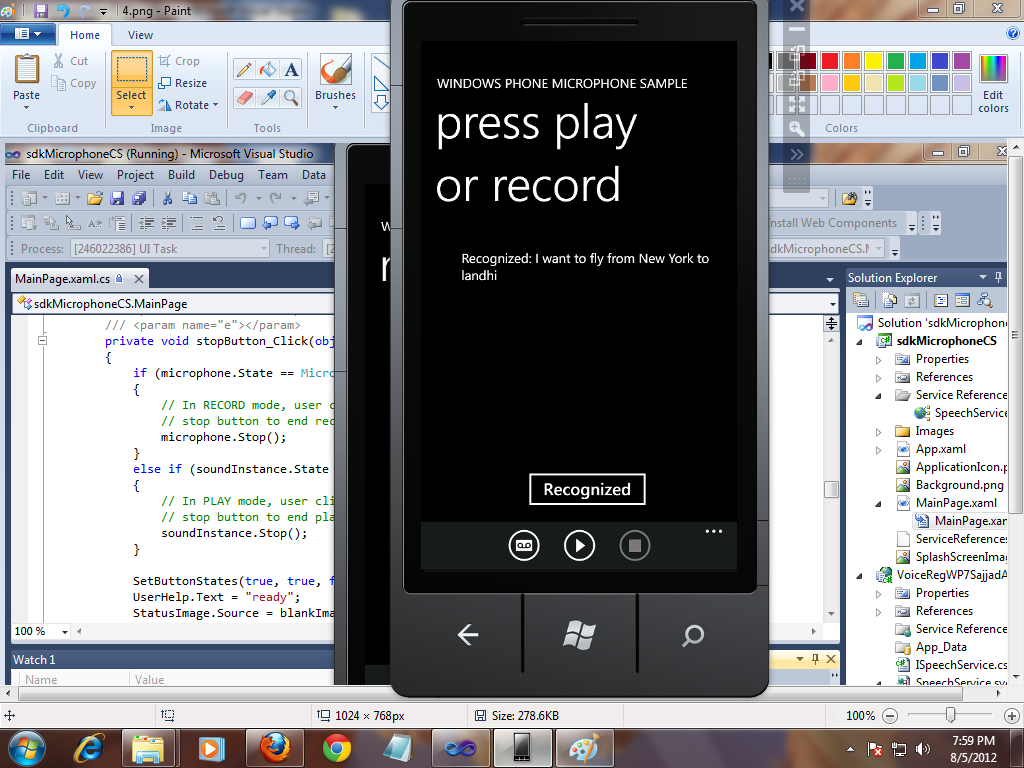
Today I will Show you Voice Recognition In Windows Phone 7 (WP7) or Voice to Text In Windows Phone 7 (WP7).
This Is a very Important Topic for Which I searched a but could not get any Success .

We can not add System.Speech.Recognition .dll in Windows Phone 7 if you try to add this dll in Windows Phone 7 Project you will get an Error.


So the question is then how will we recognize the voice in Windows Phone 7 .
there is an architecture to follow this architecture we can easily recognized Voice on Windows Phone.
Voice Recognition In Windows Phone 7


So,
 First We Recode Voice From Windows Phone 7
Then Send This voice to Web Service having Voice Recognition Facility
And We Getting Response from Server .

Now Here First We make a WCF(.SVC) Web service.
in web add a following Method
public string RecognizeSpeech(byte[] speechToParse, int sampleRate)
        {
            SpeechRecognitionEngine sre = new SpeechRecognitionEngine();

          /*  if (_grammar == null)
                InitializeGrammar();
            sre.LoadGrammar(_grammar);*/
          Grammar testGrammar =
            new Grammar(new GrammarBuilder("Ya Allah"));
            testGrammar.Name = "Test Grammar";
            sre.LoadGrammar(testGrammar);
         Grammar testgrammar1 =  new Grammar(new GrammarBuilder("Android"));
            testgrammar1.Name = "Test Grammar";
            sre.LoadGrammar(testgrammar1);
        Grammar testgrammar2 = new Grammar(new GrammarBuilder("Windows Phone"));
           testgrammar2.Name = "Test Grammar";
            sre.LoadGrammar(testgrammar2);
          Grammar testgrammar3 = new Grammar(new GrammarBuilder("Pakistan"));
            testgrammar3.Name = "Test Grammar";
            sre.LoadGrammar(testgrammar3);
        Grammar testgrammar4 = new Grammar(new GrammarBuilder("Sajjad Awan"));
            testgrammar4.Name = "Test Grammar";
            sre.LoadGrammar(testgrammar4);
            //sre.LoadGrammar(new DictationGrammar());

Choices cities = new Choices(new string[] { "Los Angeles", "New York",
"Chicago", "San Francisco", "Miami", "Dallas","landhi" });
           //Choices 
           GrammarBuilder gb = new GrammarBuilder();
           gb.Append("I want to fly from");
           gb.Append(cities);
           gb.Append("to");
           gb.Append(cities);

           // Construct a Grammar object and load it to the recognizer.
           Grammar cityChooser = new Grammar(gb);
           cityChooser.Name = ("City Chooser");
           sre.LoadGrammarAsync(cityChooser);
           MemoryStream ms = new MemoryStream(speechToParse);
 var formatInfo = new SpeechAudioFormatInfo(sampleRate,
AudioBitsPerSample.Sixteen, AudioChannel.Mono);
           sre.SetInputToAudioStream(ms, formatInfo);
        
            
           var result = sre.Recognize();
            ms = null;

            if (result == null )
                return "?";
            else
                return result.Text;
        }

and Also Add In ServiceContract

 [OperationContract]
        string RecognizeSpeech(byte[] speechToParse, int sampleRate);
In Windows Phone

add Foloowing Code in Pageload event
BasicHttpBinding binding = new BasicHttpBinding()
{ MaxReceivedMessageSize = int.MaxValue, MaxBufferSize = int.MaxValue };
EndpointAddress address =
new EndpointAddress(@"http://localhost:40427/SpeechService.svc");
_client = new SpeechServiceClient(binding, address);
/*_client.CreateWavStreamCompleted +=;
new EventHandler(_client_CreateWavStreamCompleted);*/
_client.RecognizeSpeechCompleted +=
new EventHandler(_client_RecognizeSpeechCompleted);
Note In above code you have to generate Event by presings tab Button from key board Two times and not Copy paste
Here the method will Reply to server the following Result
void _client_RecognizeSpeechCompleted(object sender,
RecognizeSpeechCompletedEventArgs e)
        {
txtRecognized.Text = String.Format("Recognized: {0}", e.Result);


}
For Recoding Voice I use Windows Phone 7 sample Sample Code available on MSDN .
1) on Button Press event I start Voice Recording.
2) another Button Press event  I stop Voice Recording.
3)There is a Button Name Recognized press event through which i send Recoded voice to web Service and Result will be show in a textbock.

Note this Service only Recognizes Those words that you Define in Dictionary .

SOURCE CODE DOWNLOAD

Or

SOURCE CODE DOWNLOAD (Recommended)


 Some Out put Screen Short


Voice Recognition In Windows Phone 7


Voice Recognition In Windows Phone 7


Voice Recognition In Windows Phone 7


Voice Recognition In Windows Phone 7


Voice Recognition In Windows Phone 7


Jul 29, 2012

Access XML File Hosted on Php Server In Windows Phone 7

Views:

Access XML File Hosted on Php Server In Windows Phone 7
To Day I show you how to Access XML File Hosted on Php web Server Server or any other Server  In Windows Phone 7.

As we Know that Use XML Files For Storing data and Retrieving Data Through LINQ (Language Integrated Query  ).

We can Access an XML file From a Local (Isolated Storage  ) and also From a web server Where XML file Is Hosted .


Note In XML File We Can Store XML file on PHP Server or on Free web Hosting Server.
Following Are the Steps Please Follow it.
First We Create an account on  http://www.000webhost.com/  .It Provides Free PHP web Hosting .Note during Signup Choose SUB Domain which is free and (recommended).
Access XML File Hosted on Php Server In Windows Phone 7

Then Confirm Then Confirmation Email.

Now After Confirmation an Window open in which Select Domain Name From Drop Down and Press Go Buttton By this You Move To Control Penal of You Hosting Account.
Access XML File Hosted on Php Server In Windows Phone 7


Now Select File Manager  (Clcik File Manager ) It ask for Password Enter the Password Which you Write in Signup time.
Access XML File Hosted on Php Server In Windows Phone 7

After this you are now in FTP manager Click Public Folder .Now you have to upload an XML file here i don't have any XML you can download Here Which I uploaded on Server .
my XML file Contains Following Data

<?xml version="1.0" ?>
 <People>
  <Person FirstName="Mohammad Sajjad Ashraf" LastName="AWAN" Age="27" />
  <Person FirstName="Mohammad Javed" LastName="Ashraf" Age="27" />
  <Person FirstName="Mohammad Zain Farooq" LastName="Ansari" Age="27" />
  <Person FirstName="Mohammad Irfan" LastName="Khan" Age="26" />
  <Person FirstName="Mohammad Jibran Ahmed" LastName="Khan" Age="28" />
  <Person FirstName="Kate" LastName="Smith" Age="27" />
  <Person FirstName="Tom" LastName="Brown" Age="30" />
  <Person FirstName="Tim" LastName="Stone" Age="36" />
<Person FirstName="Ann" LastName="Peterson" Age="27" /> 
</People>
Now you Xml File is Live and Sucesfully Hosted.
for viewing  URL of hosted XML file Click (Open Link) it open XML file in new Windows with Complete URL Please Save this URL It needs you in further Steps .
Access XML File Hosted on Php Server In Windows Phone 7

So open Visual Studio and Make a Simple  Project on Windows phone 7 on C#.
you Need a list box with A data Template .List box has Following Code .
<ListBox x:Name="listBox2">
     <ListBox.ItemTemplate>
         <DataTemplate>
              <StackPanel Margin="20" >
                       <TextBlock Text="{Binding FirstName}"/>
                       <TextBlock Text="{Binding LastName}"/>
              </StackPanel>
           </DataTemplate>
        </ListBox.ItemTemplate>
 </ListBox>


Now Add a Class in Project Name Person and Write Following Code

public class Person
    {
        string firstname; string lastname;
        int age;
        public string FirstName
        {
            get { return firstname; }
            set { firstname = value; }
        }
        public string LastName
        {
            get { return lastname; }
            set { lastname = value; }
        }
        public int Age
        {
            get
            {
                return age;
            }
            set
            { age = value; }
        }
    }
And Here The Method Which Loads XML Data From PHP server.
public void loadXmlFromPHpServer(string xmlUrl, ListBox listbox)
   {
   try
   {
   WebClient client = new WebClient();
   client.OpenReadCompleted += (sender, e) =>
   {
   if (e.Error != null)
   return;
   Stream str = e.Result;
   XDocument xdoc = XDocument.Load(str);
   var filteredData = from c in xdoc.Descendants("Person")
   where c.Attribute("Age").Value == "27"
   select new Person()
   {
   FirstName = c.Attribute("FirstName").Value,
   LastName = c.Attribute("LastName").Value
   };
   listbox.ItemsSource = filteredData;
   textBlock1.Text = "Total Items are Loaded =" + filteredData.Count<Person>();
   };
   client.OpenReadAsync(new Uri(xmlUrl, UriKind.Absolute));
   }
   catch (Exception)
   {

   }
   }
You can Call This Method By Using Following Code on PageLoadEvent or Clcik event of Button Etc.
 loadXmlFromPHpServer("http://muhammadsajjadashrafawan.comyr.com/MohammadSajjadAshrafAwan.xml", listBox2);
BENEFITS
1) In this  you can Update Data at Any time
2)It Free Data Server just Only For Data Not For Processing and Computation.
3)Data Is update By Admin .
4)We can Update aur Add more Data in XML File After Your Has been Published in Market Place and It Effects deploy  on  all user who Uses Your App.


DOWNLOAD COMPLETE SOURCE CODE

SCREEN SHORTS
Access XML File Hosted on Php Server In Windows Phone 7


Jul 15, 2012

Access Asp.Net Web Service KSoap In android

Views:

Access Asp.Net Web Service KSoap In android

To day I show you how to Access .NET Web service (K Soap  Service) in android .
 As you may know, we often want to access Web services via hand-held devices, and most likely you will run into trouble parsing the WSDL and the SOAP messages.

This is very Important topic by knowing this technique you can easily make Android application of you asp.net website ,web Application and web services.

Please follow the Following Steps:


First You have to Download the Ksoap assembly jar file and to include in Project .

Getting Started with KSOAP on Android


First things first, so you should now go ahead and download the KSOAP library from Sourceforge Google code (*UPDATE* thanks Freddy):
http://code.google.com/p/ksoap2-android/downloads/detail?name=ksoap2-android-assembly-2.4-jar-with-dependencies.jar&can=2&q=


Then copy and paste the KSOAP library in the folder where your Android project will reside. Open Eclipse, start a new Android Project, right-click on the project's name and choose Properties, like this:

Access Asp.Net Web Service KSoap In android

The next thing you need to do is to Add the KSOAP .JAR into the Android Project:

Access Asp.Net Web Service KSoap In android


Go ahead an press Add JARs... button. Then navigate to the folder where your KSOAP library is and select it. Once you have this done, you are ready to start working with your Web Service library.

Simple Web Service Calls with KSOAP


First, let's take a look at our web service call in Visual Studio:

[WebService(Namespace = "http://vladozver.org/")]
public class SimpleWebServices : System.Web.Services.WebService
{
      [WebMethod]
      public int GetSumOfTwoInts(int Operand1, int Operand2 )
      {
         return Operand1 + Operand2;
      }
}
 
The service is deployed on my local machine which is on the address: 
192.168.1.3. Pay attention on the ending "/" in the Namespace.
So it mean when you access the  web service you have to use your desktop machine 
ip address  like (192.168.1.3) instead of Local host.
While creating this webservice, it asks for a namespace and here the namespace is www.tempura.org (pretty much the default namespace which I have not changed!). You can open this service from http://grasshoppernetwork.com/NewFile.asmx.
When you open this webservice in browser, you can see a window like in the figure below:
Access Asp.Net Web Service KSoap In android
I have marked it to show how to get the namespace name. It will also show the list of methods, which you cannot test. So how to know the arguments and return type? Click on the method and see the figure below:
Figure2-soap_structure.png
Now you know what function you are calling, its arguments, return type and namespace (and of course URL).
For calling this method you need ksoap library, which you can download from here.
Copy the downloaded zip file in any appropriate location. This is an external jar file which you need to include in your Android project.
Start an Android project and select Android API. Right click on the project node in the workspace, properties->java build path->libraries->Add external jar.
Browse and select your ksoap jar file.
All we have to do now is to write a method which can call the web service and return the result. Remember that Android gives you an exception if you try any socket operation from main activity thread. Therefore it is better to write a separate class and isolate soap related functions.
Let us now understand the logic of this class.

package my.MySOAPCallActivity.namespace; 
import org.ksoap2.SoapEnvelope; 
import org.ksoap2.serialization.PropertyInfo; 
import org.ksoap2.serialization.SoapObject;
import org.ksoap2.serialization.SoapSerializationEnvelope;
import org.ksoap2.transport.HttpTransportSE;
public class CallSoap 
{
public final String SOAP_ACTION = "http://tempuri.org/Add";

public  final String OPERATION_NAME = "Add"; 

public  final String WSDL_TARGET_NAMESPACE = "http://tempuri.org/";

public  final String SOAP_ADDRESS = "http://grasshoppernetwork.com/NewFile.asmx";
public CallSoap() 
{ 
}
public String Call(int a,int b)
{
SoapObject request = new SoapObject(WSDL_TARGET_NAMESPACE,OPERATION_NAME);
PropertyInfo pi=new PropertyInfo();
pi.setName("a");
        pi.setValue(a);
        pi.setType(Integer.class);
        request.addProperty(pi);
        pi=new PropertyInfo();
        pi.setName("b");
        pi.setValue(b);
        pi.setType(Integer.class);
        request.addProperty(pi);

SoapSerializationEnvelope envelope = new SoapSerializationEnvelope(
SoapEnvelope.VER11);
envelope.dotNet = true;

envelope.setOutputSoapObject(request);

HttpTransportSE httpTransport = new HttpTransportSE(SOAP_ADDRESS);
Object response=null;
try
{
httpTransport.call(SOAP_ACTION, envelope);
response = envelope.getResponse();
}
catch (Exception exception)
{
response=exception.toString();
}
return response.toString();
}
}
 
First SOAP_ACTION = namespace as seen in figure 1+function name;
  • OPERATION_NAME = name of the web method;
  • WSDL_TARGET_NAMESPACE = namespace of the webservice;
  • SOAP_ADDRESS = absolute URL of the webservice;
SOAP works on request response pair. So first you need to build a request object which can call the web service.

SoapObject request = new SoapObject(WSDL_TARGET_NAMESPACE,OPERATION_NAME);
 Now the operation or the method that you intend to call has some arguments which you need to attach to the request object. This is done through PropertyInfo Instance pi. The important thing to notice here is that the name that you use in setName() method must be the exact name of the property that you have seen in the figure above and in setType(), the data type of the variable must be specified. Using addProperty(), add all the arguments.
Using setValue() method, set the value to the property.
PropertyInfo pi=new PropertyInfo(); 
pi.setName("a"); 
pi.setValue(a); 
pi.setType(Integer.class); 
request.addProperty(pi);

Create a serialized envelope which will be used to carry the parameters for SOAP body and call the method through HttpTransportSE method.
Now you are very much ready with techniques for calling web method and getting the result. For simplicity, we have made a simple Android GUI with two EditText and one Button.
See the main.xml code as below:
 
 
<?xml version="1.0" encoding="utf-8"?>
<LinearLayout xmlns:android="http://schemas.android.com/apk/res/android"
    android:orientation="vertical"
    android:layout_width="fill_parent"
    android:layout_height="fill_parent"
    >
<TextView  
    android:layout_width="fill_parent" 
    android:layout_height="wrap_content" 
    android:text="@string/hello"
    />
<EditText 
        android:id="@+id/editText1"
    android:layout_width="230dp"
    android:layout_height="wrap_content" >
    <requestFocus />
</EditText> 
<EditText
    android:id="@+id/editText2"
    android:layout_width="232dp"
    android:layout_height="wrap_content" />
<Button
    android:id="@+id/button1"
    android:layout_width="229dp"
    android:layout_height="wrap_content"
    android:text="@string/btnStr" />
</LinearLayout>
 
 
We want to call the method from button click event from activity class. See the code below:
 
package my.MySOAPCallActivity.namespace;
import android.app.Activity;
import android.app.AlertDialog;
import android.os.Bundle;
import android.view.View;
import android.view.View.OnClickListener;
import android.widget.Button;
import android.widget.EditText;
public class SimpleAsmxSOAPCallActivity extends Activity {
    /** Called when the activity is first created. */
    @Override
    public void onCreate(Bundle savedInstanceState) {
        super.onCreate(savedInstanceState);
        setContentView(R.layout.main);
        Button b1=(Button)findViewById(R.id.button1);
       final  AlertDialog ad=new AlertDialog.Builder(this).create();
         
        b1.setOnClickListener(new OnClickListener() { 
@Override
public void onClick(View arg0) {
// TODO Auto-generated method stub
CallSoap cs=new CallSoap();

try
{
EditText ed1=(EditText)findViewById(R.id.editText1);
EditText ed2=(EditText)findViewById(R.id.editText2);
int a=Integer.parseInt(ed1.getText().toString());
int b=Integer.parseInt(ed2.getText().toString());

ad.setTitle("OUTPUT OF ADD of "+a+" and "+b);

String resp=cs.Call(a, b);
ad.setMessage(resp);
}catch(Exception ex)
{
ad.setTitle("Error!");
ad.setMessage(ex.toString());
}
ad.show(); }
});
    }
}


All you do now is get the values for a and b from EditTexts and pass the values to call method. Call method returns the result of the web method.
 
String resp=cs.Call(a, b);
ad.setMessage(resp);

 
Once you get this up and running, you are very much likely to get an error like android.os.NetworkOnMainThreadException.
That is because Android does not permit you to run socket related operations from main thread as we had already discussed. So you need to run a thread or create a thread from where you can perform these operations. You can easily model the CallSoap class as one implementing runnable and get the stuff. But I wanted to have the calling part as a separate entity. So I just made a separate thread class for calling the CallSoap method. It gives a nice layered implementation so that the thread that is calling the function where SOAP related activities are performed is completely different.
But now the problem is your activity thread and the network thread are in multi-thread operation and chances are your main thread ends before getting the result from the SOAP operation. So I used a primitive way of waiting for the result to arrive and then using it.
The caller class.
public class Caller  extends Thread  
{ public CallSoap cs;       public int a,b; 

       public void run(){

            try{

               cs=new CallSoap();

               String resp=cs.Call(a, b);

MySOAPCallActivity.rslt=resp;}catch(Exception ex)

{MySOAPCallActivity.rslt=ex.toString();
}    
}
}


Modified OnClick method of the button in activity thread which calls SOAP through this simple caller class.
package my.MySOAPCallActivity.namespace;
import android.app.Activity;
import android.os.Bundle;
import android.app.AlertDialog;
import android.view.View;
import android.view.View.OnClickListener;
import android.widget.Button;
import android.widget.EditText;
public class MySOAPCallActivity extends Activity {
public static String rslt="";    /** Called when the activity is first created. */
    @Override
    public void onCreate(Bundle savedInstanceState) {
        super.onCreate(savedInstanceState);
        setContentView(R.layout.main);
        Button b1=(Button)findViewById(R.id.button1);
        final  AlertDialog ad=new AlertDialog.Builder(this).create();
          
         b1.setOnClickListener(new OnClickListener() {
  
@Override public void onClick(View arg0) {
// TODO Auto-generated method stub 

 try
{ 
EditText ed1=(EditText)findViewById(R.id.editText1);
EditText ed2=(EditText)findViewById(R.id.editText2); 
int a=Integer.parseInt(ed1.getText().toString());
int b=Integer.parseInt(ed2.getText().toString()); rslt="START"; 
Caller c=new Caller(); c.a=a;
c.b=b; c.ad=ad;
c.join(); c.start();
while(rslt=="START") {
try {
Thread.sleep(10); 

}catch(Exception ex) {

 }
} ad.setTitle("RESULT OF ADD of "+a+" and "+b);
ad.setMessage(rslt); 

}catch(Exception ex) {
ad.setTitle("Error!"); ad.setMessage(ex.toString());
}
ad.show(); 
} });
    }
}


Finally you get the results as shown below:
Access Asp.Net Web Service KSoap In android

DOWNLOAD SOURCE CODE OR DOWNLOAD SOURCE CODE (Recommended To Download)

Apr 29, 2012

How to make Asp .NET web Service Soap service

Views:

http://sharepointmagazine.net/wp-content/uploads/2008/11/image16.png
Web services very use full technology .It Mostly used  in Coors plate form  work .By using web service we  can perform most of remote work. for example if we have web sites web1 and web2 and we want to share it data ten most selling Product of web 2 to web 1 then would we could do for this we make a web service on web 2  and though service URL we can access data and all method .We can also use web service on smart phone and Windows Phone7 ,android and iPhone etc .
So , let Start make First Web Service .
 we use Visual Studio 2010 for making web service


To create the new Web Service:
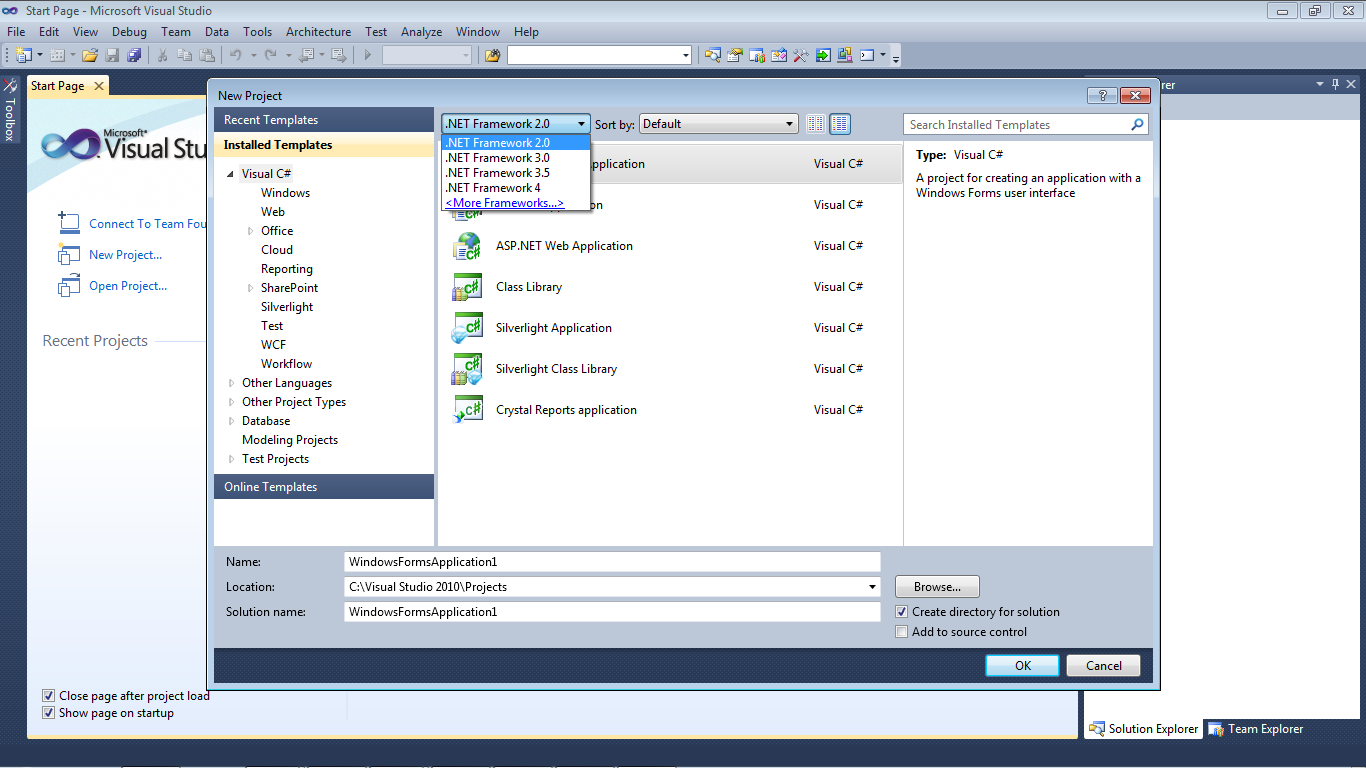
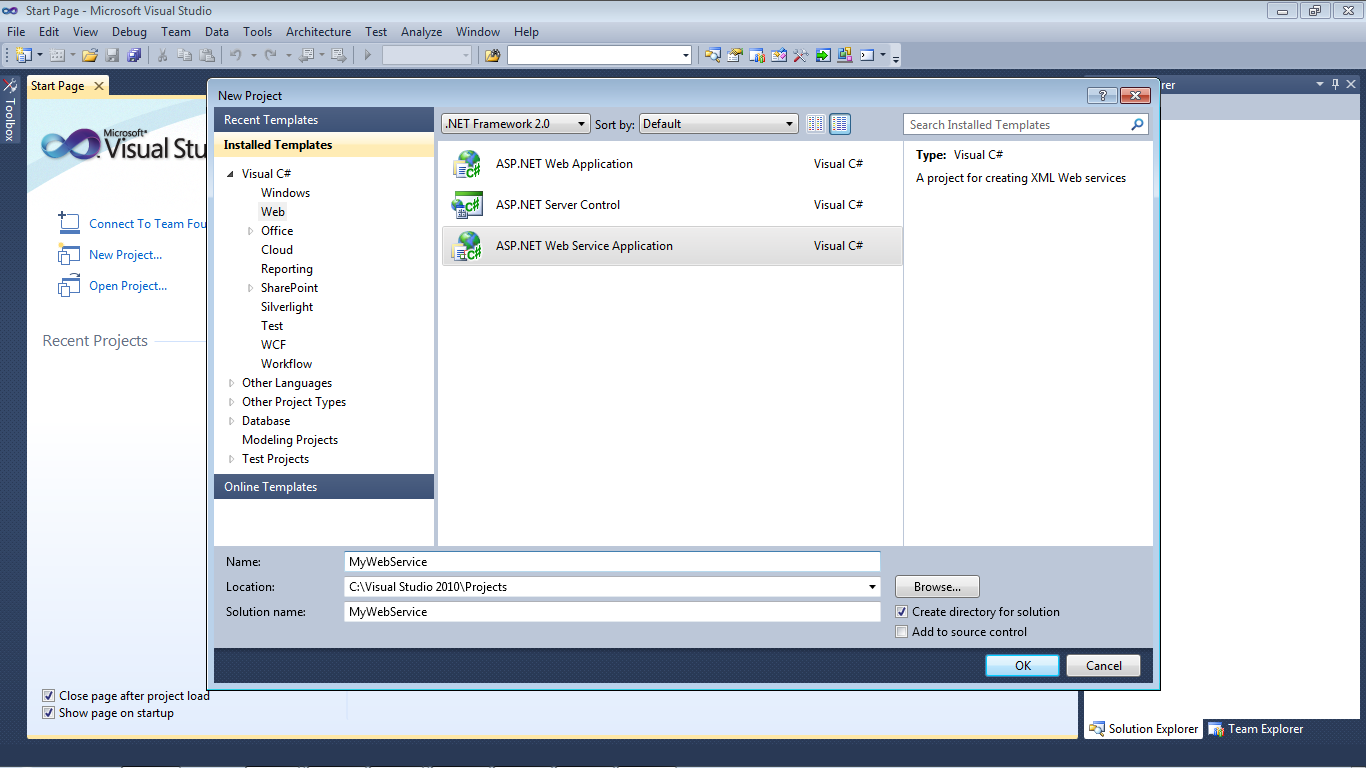
  1. On the Visual Studio 2010 file menu, choose New Project.
  2.  From drop down list .NET Framework choose .NET Framework 2.0 or 3.5 or 3.0
    Picture 1. How to create Web Service in ASP.NET
    Picture 1. How to create Web Service in ASP.NET

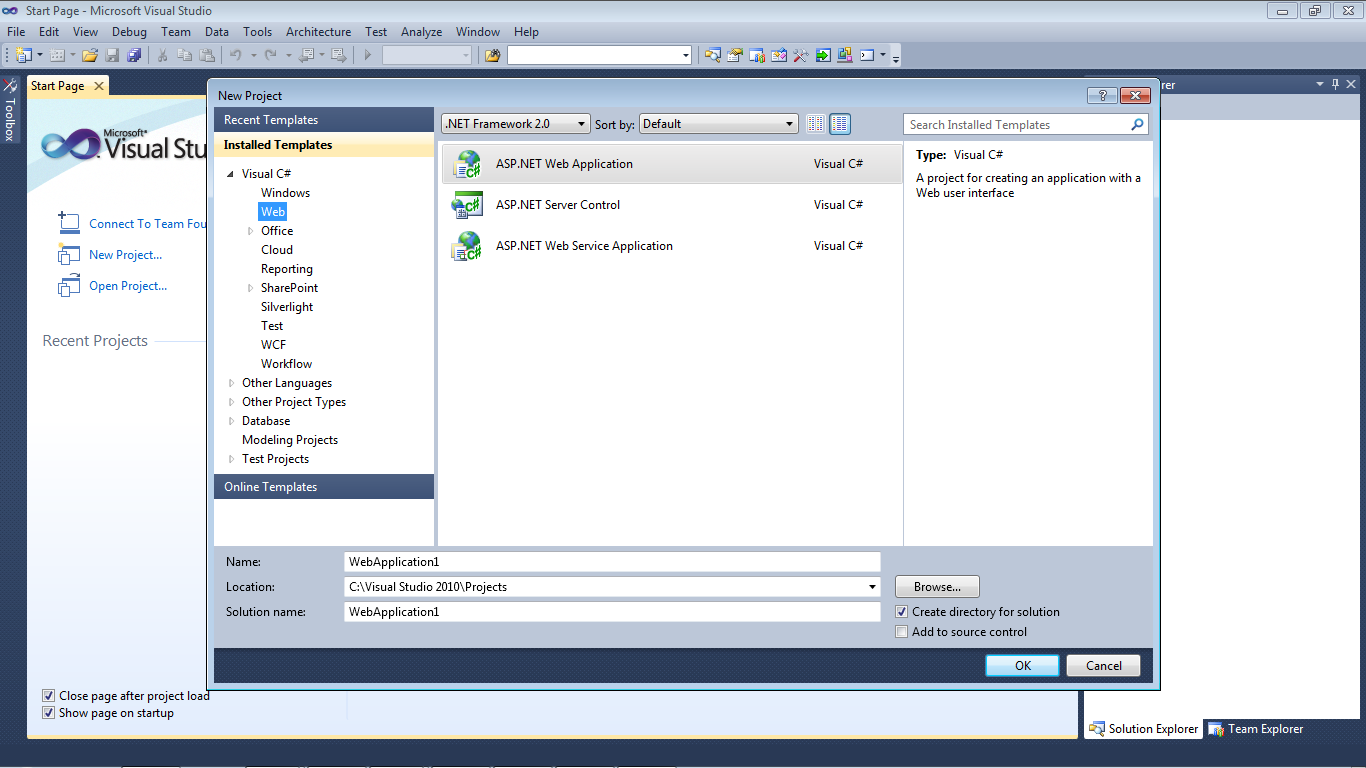
  3. From menu Recent Templates choose -> Visual C#->Web.


Picture 2. How to create Web Service in ASP.NET

  • Go to on the right pane and click on ASP.NET Web Service Application.
  • Enter the name of the web service in the Name text box and click OK.


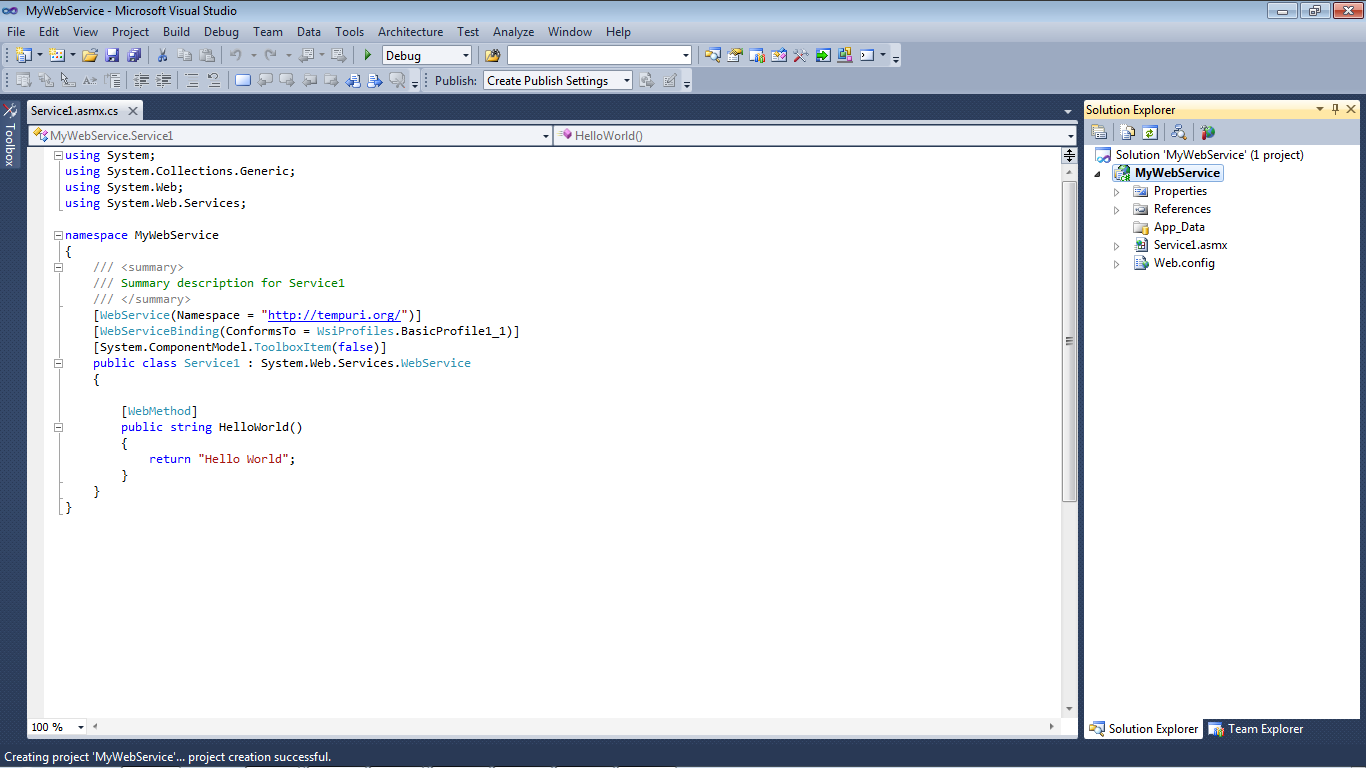
Picture 3. How to create Web Service in ASP.NET

Visual Studio .NET creates a project that contains  a .asmx file and code-behind class that provides required functionality.


Picture 4. How to create Web Service in ASP.NET

So here by default one method is already created with name helloworld and you can create more method as you can  but remember  always put this line on each and every method that to want to call through web service.
[WebMethod]
Video on web service


Feb 20, 2012

Call A WebService From Windows Phone 7

Views:

Today,I will show you how to Call A Web Service hosted on a live server or local machine from Windows Phone 7.

First We create a Service,
  1. New Project
  2. Click on C#
  3. Then Select Web
  4. Asp.net webservice
If You have any confusion in creating a web service,please see video at the bottom of this post which will show you how to create web service.

Write this code (Make sure to use your own
data base connection string and data base element )

Download Source Code


using System;
using System.Collections.Generic;
using System.Linq;
using System.Web;
using System.Web.Services;
using System.Data;
using System.Data.SqlClient;
using System.Xml;
using System.Xml.Linq;

namespace WebService1
{
///

/// Summary description for Service1
///

[WebService(Namespace = "http://tempuri.org/")]
[WebServiceBinding(ConformsTo = WsiProfiles.BasicProfile1_1)]
[System.ComponentModel.ToolboxItem(false)]
// To allow this Web Service to be called from script, using ASP.NET AJAX, uncomment the following line.
// [System.Web.Script.Services.ScriptService]
public class Service1 : System.Web.Services.WebService
{

[WebMethod]
public string HelloWorld()
{
return "Hello World";
}

[WebMethod]
public string Data()
{
SqlConnection sqlcon = new SqlConnection("Data Source=CE-HP;Initial Catalog=BegVCSharpEvents;Integrated Security=True");
sqlcon.Open();
SqlCommand comm = new SqlCommand("Select * from Events", sqlcon);

DataSet ds = new DataSet("Dataset");
SqlDataAdapter da = new SqlDataAdapter(comm);
da.Fill(ds, "DataTable");

ds.WriteXml("C:\\TRYXML.xml");

XmlDataDocument xddoc = new XmlDataDocument(ds);

return xddoc.InnerXml;
}
}
}

Run this project and you will get a link like, http://localhost:1937/Service1.asmx
Please do not close the browser and do not stop the service.
Now create a windows Phone 7 Application.
Open Main.Xml Page.

Rigth click on  Reference.

  1. Add service Reference
  2. Enter URL (http://localhost:1937/Service1.asmx) in address,Now press the go button,It will show you a service and its method (make sure your local host service is open ) 
  3. Then Press Ok button in Main.xml Page and write the following code.
using System;
using System.Collections.Generic;
using System.Linq;
using System.Net;
using System.Windows;
using System.Windows.Controls;
using System.Windows.Documents;
using System.Windows.Input;
using System.Windows.Media;
using System.Windows.Media.Animation;
using System.Windows.Shapes;
using Microsoft.Phone.Controls;


using System.Xml.Linq;
using System.Xml;
using System.Xml.Serialization;
using System.IO;
using WindowsPhoneApplication1.ServiceReference1;

namespace WindowsPhoneApplication1
{
public partial class MainPage : PhoneApplicationPage
{
// Constructor
public MainPage()
{
InitializeComponent();
}

private void btn1_Click(object sender, RoutedEventArgs e)
{
ServiceReference1.Service1SoapClient ob = new ServiceReference1.Service1SoapClient();
ob.DataAsync();
ob.DataCompleted += new EventHandler(ob_DataCompleted);


}

void ob_DataCompleted(object sender, ServiceReference1.DataCompletedEventArgs e)
{

TextReader reader = new StringReader(e.Result);

XDocument xdoc = XDocument.Load(e.Result);

var events = from event1 in xdoc.Descendants("DataTable")
select new
{
Id = event1.Element("Id").Value
};
foreach (var item in events)
{
textBlock1.Text += item.Id + "\n";
}

}
}
}
Now run the project and click the button.
then the textblock will show you the data which comes from web service.

Download Source Code

This video will demonstrate you how to create Asp.net web service.

Become a Fan

visual studio learn